0Prepare
Transcribe from 26 languages
An episode arrives with no text. It leaves with one.
For studios receiving an original version with no script
Thirteen African
- Swahili
- Hausa
- Wolof
- Yorùbá
- Lingala
- Igbo
- Xhosa
- Zulu
- Amharic
- Shona
- Somali
- Northern Sotho
- Ganda
Glyph check, on screen:Ɛ ɛ Ɔ ɔ Ɲ ɲ Ŋ ŋ ẹ ọ ṣ ǹ ñ à á â
Thirteen others
- French
- English
- Spanish
- Portuguese
- German
- Italian
- Dutch
- Arabic
- Chinese (Mandarin)
- Cantonese
- Hindi
- Korean
- Japanese
Transcription runs on the workstation. One more language is not one more subscription.
The problem
With no starting script, an episode is retyped by ear. Two days of work before the adaptation even begins.
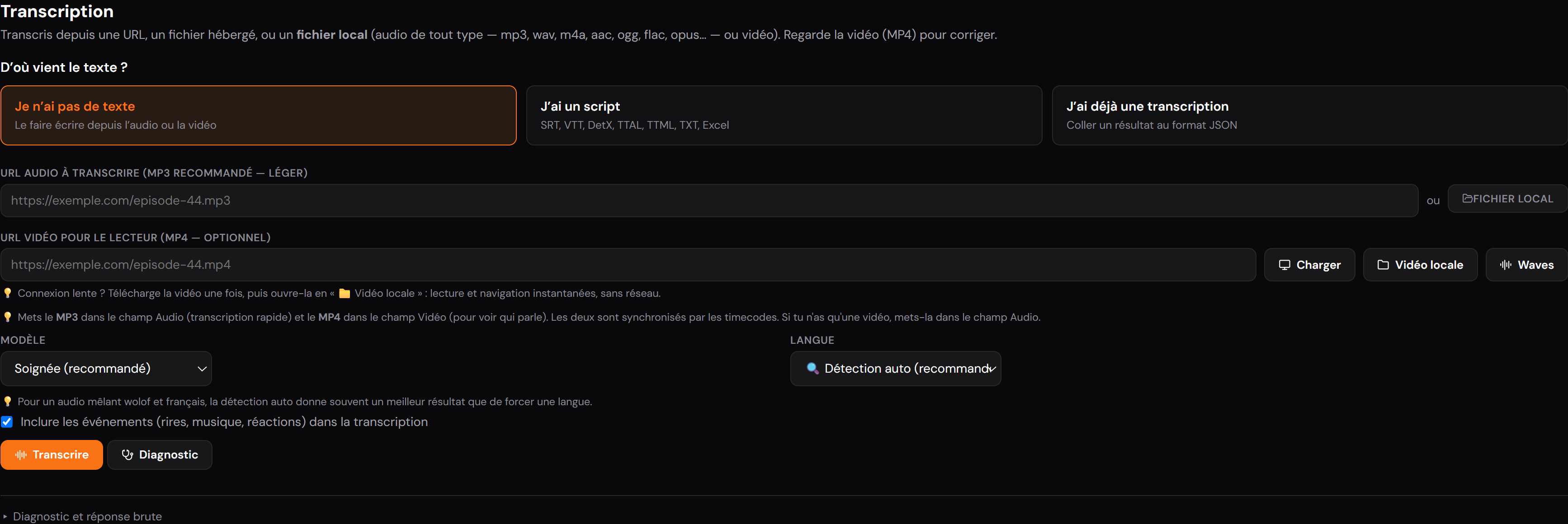
The original version is transcribed from the video, in 26 source languages including thirteen African ones: Wolof, Yoruba, Lingala, Igbo, Hausa, Swahili, Xhosa, Zulu, Amharic, Shona, Somali, Northern Sotho, Ganda.
The answer
Twenty-six source languages
African languages are treated on the same footing as the rest, which is rarely the case elsewhere. The language is chosen, or detected automatically.
- Is Wolof supported? #
- Yes, as are Yoruba, Lingala, Igbo, Hausa, Swahili, Xhosa, Zulu, Amharic, Shona, Somali, Northern Sotho and Ganda.
- What if the audio mixes two languages? #
- Leave automatic detection on: it beats a forced choice on dialogue that switches language mid-scene.
Progress tracking
A transcription runs from seconds to several minutes. Phases are named, elapsed time is shown, and the wait can be stopped.
- How long does a transcription take? #
- It depends on the media length and on your service. The application measures your previous runs and offers an estimate from the second one onwards, never before, so it promises nothing it has not observed.
- Can I switch tabs while it runs? #
- Yes, the work continues. A sound signals completion, and can be turned off.
Transcribe with no network
An offline engine can be installed on the workstation. The content never leaves the machine, nothing is billed by the minute, and transcription stays possible with no connection.
- When is it better than the online service? #
- When the content must not leave: embargo, confidentiality clause, a client who forbids it by contract. Or simply when there is no connection. These were jobs you had to turn down on principle.
- Is the result equivalent? #
- No, and it is stated on screen before starting: the offline engine **does not separate speakers**. Every line arrives on a single character, to be split afterwards. Quality also depends on the model installed, and your own processor does the work.
Specifications
| Source languages | 26, including 13 African |
|---|---|
| Observed accuracy | excellent: French, English, Spanish, Portuguese, German, Italian, Dutch · good: Arabic, Chinese (Mandarin), Cantonese, Hindi, Korean, Japanese, Swahili, Hausa · improving: Wolof, Yorùbá, Lingala, Igbo, Xhosa, Zulu, Amharic, Shona, Somali, Northern Sotho, Ganda |
| Input | the programme’s audio track, WAV, MP3, M4A, AAC, OGG, FLAC |
| Output | timecoded lines, sent straight into the script |
| Fidelity levels | careful or standard |
| Events | laughter, music and reactions, included or excluded |
| Network | required, transcription goes through an online service, with your own credentials |
Learning to use it
Step-by-step walkthroughs with screenshots: Transcribe an episode with no script.